Tales of Eternia Remastered fixes: the Switch analog movement bug and its d-pad workaround, long Switch 1 loads, and the docked Steam Deck 720p lock.
Tales of Eternia Remastered Switch Issues and PC Fixes
Two workarounds cover almost everything players have reported since the October 15, 2026 console launch. On Switch 1 and Switch 2, explore with the d-pad: analog stick input snaps your character onto horizontal or vertical lines instead of holding a diagonal, and that defect is absent from the PC and PSP versions. On a docked Steam Deck, add the launch option SteamDeck=0 %command% and the hard 720p output lock lifts, letting you raise the resolution as high as 4K.
- Switch 1, Switch 2 and the Switch 1 version running on Switch 2 all show the analog movement bug; the d-pad is unaffected and is the workaround.
- PC is clean on the same controller, so this is a Switch build fault rather than a hardware fault.
- Docked Steam Deck is locked to 720p until you add the
SteamDeck=0 %command%launch option; afterwards the resolution goes up to 4K. - The game is capped at 60fps everywhere, so 100Hz and 144Hz displays need the refresh rate capped to 120Hz or 60Hz.
These notes reflect the game as of the October 15 to 16, 2026 launch week, from launch-window hands-on testing and Bandai Namco's patch notes. No official statement on the movement bug existed when this page was written.
The Switch Analog Movement Bug and the D-Pad Workaround
On both Switch consoles the character refuses to hold a diagonal when you steer with a stick, sliding onto a cardinal direction instead. It shows up during ordinary field and town movement rather than in menus, and it reproduces across controllers: launch-window testing saw it with an 8BitDo Pro 3 on Switch 2, with the Pro Controller and Joy-Cons on Switch 1 and Switch 2, and found the same pad normal on the Steam version.
"It basically snaps to horizontal or vertical movement instead of sticking to diagonal during exploration and other movement. This is not a problem with the d-pad and not present on Steam."
Media source: Tales of Eternia Remastered Nintendo Switch 2, Steam Deck, Switch 1, and ROG Ally impressions (RPG Site)
| Build | Analog stick | D-pad |
|---|---|---|
| Switch 1 (handheld, on Switch OLED and on Switch 2) | Snaps to horizontal or vertical | Unaffected |
| Switch 2 native release | Snaps to horizontal or vertical | Unaffected |
| PC (Steam) with the same controller | No issue reported | Not needed |
| PSP version (2005) | No issue reported | Not needed |
That last row matters more than it looks. The remaster is built on the 2005 PSP release rather than the original 2000 PlayStation disc, and Bandai Namco states this on its own feature page: the product was developed based on the PSP version, with some specifications changed. The PSP row is therefore a like-for-like reference, and the PC build behaves as the PSP version does.
Official source: Tales of Eternia Remastered official site, changes from the original version (Bandai Namco)
Re-read the patch notes after every update rather than assuming the bug is permanent: the day-one patch added a font option and titles carryover and fixed some text, and movement was not mentioned.
What the Remaster's Custom Menu Lets You Change
Before blaming your pad, check what the game lets you remap. Bandai Namco's official feature list is unusually specific here, and three items bear directly on control complaints:
- Field, town and dungeon key customization. Menu > Custom > Button Settings covers exploration controls in addition to battle, so you can move actions off a button you dislike pressing.
- Default movement method. Menu > Custom > Movement lets you set walking or high-speed movement as the default, separate from holding the run button while you move.
- On-screen button guides. Guides appear in the field, towns and dungeons after a stretch of no input, which helps when returning after a long break.
The same menu holds the graphics mode toggle (Remastered or Original), the SE mode toggle, brightness, auto-advance for messages, and the Boost function. Quick Recovery, which restores party HP and clears status ailments in one action from the menu screen, lives in the same menu. Autosave fires after map transitions and event endings rather than on a timer. What the Custom menu does not expose is analog sensitivity or deadzone, which is why the diagonal fault has no in-game remedy.
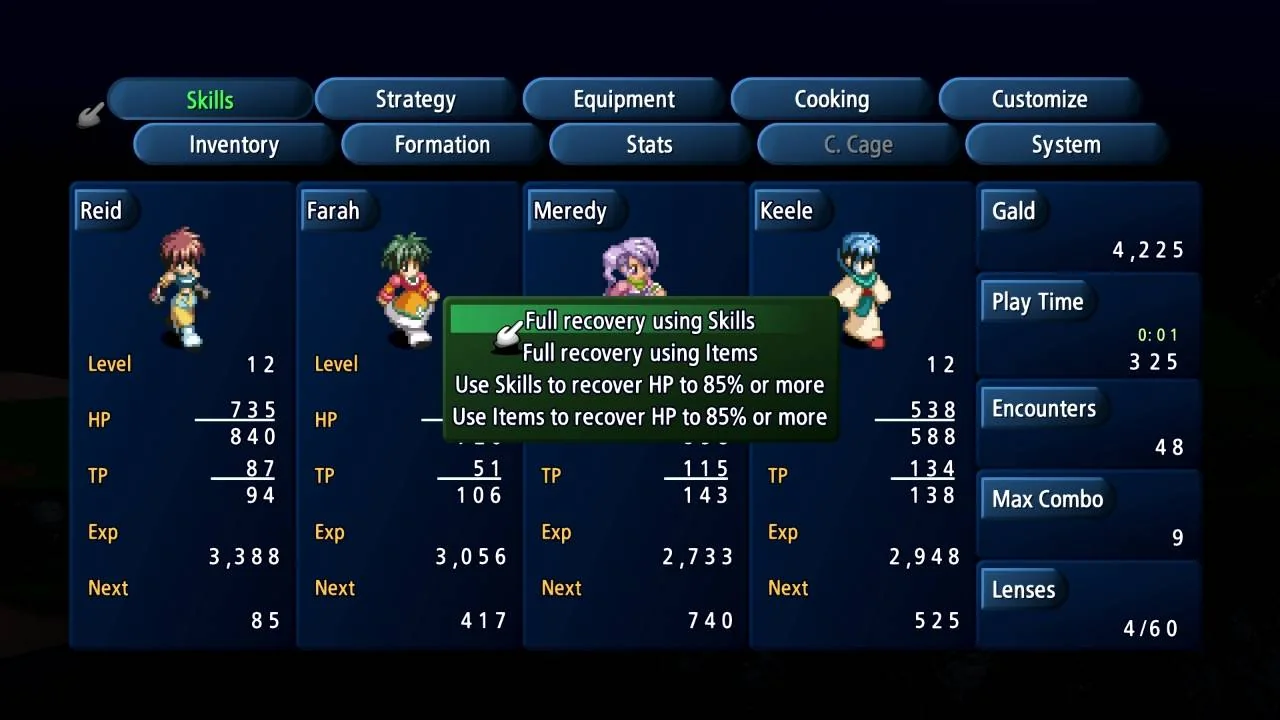
Note the naming collision that catches people out on forums: the in-game Boost function in Menu > Custom is a progression aid, unrelated to the handheld boost mode that the Switch 2 offers for Switch 1 software, covered further down.
Steam Deck Docked: the 720p Lock and the Launch Option That Lifts It
Docked Deck owners hit a second wall that has nothing to do with frame rate: the Steam release hard locks docked output to 720p, so your television gets a small picture whatever the internal resolution setting says. The fix is a launch parameter rather than a graphics option: enter SteamDeck=0 %command% in the game's launch options, without the quote marks, and the resolution becomes adjustable up to 4K (right-click the game in your library, then Properties).
| Device | Setting to change | Why |
|---|---|---|
| Steam Deck LCD | None | Reported to run as it should out of the box |
| Steam Deck OLED | Cap refresh rate to 60Hz | The game is capped at 60fps, so an uncapped panel works against it |
| Steam Deck, docked | Launch option SteamDeck=0 %command% |
Docked output is otherwise hard locked to 720p |
| PC on a 100Hz or 144Hz monitor | Cap refresh to 120Hz or 60Hz | Uncapped high refresh makes movement feel off |
| ROG Ally | None | Reported to play perfectly out of the box |
Why the Deck-specific switch is needed at all: the Steam release is a Windows build. Steam's store metadata lists Windows only, with no macOS or Linux build, so on Steam Deck the game runs through Proton and inherits the Deck detection that the launch option suppresses.
Official source: Tales of Eternia Remastered on Steam (Valve)
The 60fps Cap and High-Refresh Displays
The remaster is capped at 60 frames per second on every platform, so a 100Hz or 144Hz panel produces frame pacing that reads as imprecise, drifting movement. Capping the display to 120Hz or 60Hz fixes it, and that is a display-level setting rather than an in-game one. This is a separate problem from the Switch stick fault and it can appear on PC, where the analog bug does not exist: if your diagonals work but the character's speed feels elastic, cap the refresh rate first.
Certain minigames accept mouse input on Switch 2 and not on Switch 1. Our minigames guide lists which ones.
Switch 1 vs Switch 2: Load Times and Performance
Loading is the biggest measured gap between the Nintendo builds. The numbers below come from a launch-window test that installed the game on a Switch OLED SD card and on internal storage for Switch 2, Steam Deck and ROG Ally, then timed the trip from dashboard to title screen and the load of a save file.
| Platform | Dashboard to title screen | Loading a save |
|---|---|---|
| Switch 1 | 20 to 22 seconds | 1 to 2 seconds |
| Switch 1 version on Switch 2 | 11 to 12 seconds | About 1 second |
| Switch 2 native | 9 to 10 seconds | About 1 second |
| Steam Deck | 13 to 15 seconds | Under 1 second |
| ROG Ally | 8 to 9 seconds | About 1 second |
The initial boot is only half of the problem on Switch 1. In-game loads run long as well, and the slowest single operation is switching between the Remastered and Original graphics modes, which turns into a load of its own; the Original vs Remastered breakdown covers what that toggle changes. Long Switch 1 loads are the known cost of shipping a Unity build on that hardware, and these were single measurements on launch-week builds, so a cartridge install or a future patch could move them.
Beyond loading, the Switch 1 build shows minor performance dips in some areas, noticeable even early on during character movement, though it keeps the same 60fps target as the other platforms, and the Switch 2 build was clean in the same areas. Resolution is the more visible difference: Switch 2 renders higher in both docked and handheld play, while the Switch 1 image does not scale up cleanly at 1440p or 4K, most obviously in Remastered graphics mode.
| Switch 1 handheld setup | What you see |
|---|---|
| Normal | 720p upscaled without pixel-perfect scaling |
| Handheld boost mode on Switch 2 | Scaling corrected, reported to match the Switch 2 build |
That boost mode fixes presentation only. It does not remove the load times or the stick bug, because those are build-level rather than power-level issues. If you own both consoles, the Switch 1 version on Switch 2 is the one to pick for handheld play, and the native Switch 2 release is the one to pick if you play docked at 1440p or 4K.
The Day-One Patch: Version 2.0.0 and Update Sizes
Bandai Namco released update version 2.0.0 for every platform alongside the console launch, and it is a small patch: two additions plus text fixes. The titles change is the one completionists will feel, because a second run now keeps them, which is a meaningful shift for the New Game Plus carryover list.
"Added 'Font Style,' which allows you to change the font for in-game text ... Added 'Titles' to the carryover elements for the second playthrough and beyond. Fixed bugs in some text."
Official source: Tales of Eternia Remastered - Regarding the Release of Update Data (Day 1 Patch) (Bandai Namco)
| Platform | Update file size | Notes |
|---|---|---|
| Nintendo Switch 2 | Approx. 7 GB | Storage requirement includes the main game |
| Nintendo Switch | Approx. 300 MB | Patch only |
| PlayStation 5 | Approx. 500 MB | Patch only |
| PlayStation 4 | Approx. 1.3 GB | Patch only |
| Xbox Series X|S | Approx. 8 GB | Storage requirement includes the main game |
| Steam | Approx. 7 GB | Storage requirement includes the main game |
An internet connection is required to apply the update, and the font option only works with the game language set to Japanese, so English players see no change from that half of the patch. Check your version number before troubleshooting anything else: an install without 2.0.0 is a build Bandai Namco already replaced.
Crash Reports: What Could and Could Not Be Verified
No repeatable crash pattern surfaced in the launch-week material reviewed for this page, and the patch notes list text fixes rather than stability work. That is not proof the game never crashes, only that nothing widespread was documented at launch on any platform.
FAQ
Why does my character only move in straight lines on Switch?
Because of a movement fault in the Switch 1 and Switch 2 builds: analog input snaps to horizontal or vertical travel instead of holding a diagonal. It affects both consoles, including the Switch 1 version on a Switch 2, and it is not present on PC or the PSP version. Switch to the d-pad and it disappears.
How do I unlock the resolution on a docked Steam Deck?
Add SteamDeck=0 %command% to the game's launch options, without the quote marks, then set your resolution. Docked output is otherwise locked to 720p, and with the parameter it can reach 4K. The LCD model needed no other change, and ROG Ally worked out of the box.
Why does movement feel off on a 144Hz monitor?
The game is capped at 60fps on all platforms, so a 100Hz or 144Hz display produces pacing that reads as imprecise movement. Cap the refresh rate to 120Hz or 60Hz. This is distinct from the Switch stick fault, since it also happens on PC, where the stick behaves correctly.
Does Tales of Eternia Remastered crash on Switch?
No repeatable crash pattern was documented in the launch-week coverage reviewed here, and version 2.0.0 lists text bug fixes rather than stability work. Confirm your install reports 2.0.0 first, then report the specific area and action rather than a general Switch crash.
Related Guides
- Tales of Eternia Original vs Remastered - what the graphics and sound toggles change, and why flipping them is slowest on Switch 1.
- Tales of Eternia Remastered Battle System Guide - the encounter toggle and high-speed auto-battle referenced above.
- Tales of Eternia Minigames Guide (Remastered) - which minigames use the Switch 2 mouse controls.
- Tales of Eternia New Game Plus and Carryover - how the version 2.0.0 titles carryover changes a second run.
- How Long to Beat Tales of Eternia Remastered? - why Switch 1 load times matter more over a long playthrough.
- Tales of Eternia Leveling and Gald Farming Guide - where the fast-movement default setting pays off.
More Tales of Eternia Remastered Guides
Boxed copies exist in Japan and Europe on PS5, Switch and Switch 2, while North America was reported digital-only. Game-Key Card details, all dated.
Tales of Eternia Remastered on PS5, PS4, Xbox, Switch, Switch 2 and Steam: target resolutions, the 60fps cap, day-one update sizes and measured load times.
New to Eternia? How the destination icons work, when to use Boost and Battle Retry, which early purchases are traps, and when cooking starts paying off.
A chapter-by-chapter walkthrough hub covering all three arcs of Remastered, with links to boss strategies, Craymel dungeons and missable events.
HowLongToBeat has no remaster times yet; the 2000 original averages 33 hours for the story, 42 with sides and 73.5 hours for full completion.
Every Tales of Eternia minigame and where to find it: the Rasheans river race, Craymel Ball, Chamballoon, the stone game and the cooking contest.
Every Tales of Eternia artes family by character: Reid, Farah, Keele, Meredy, Chat and Max, with TP costs, unlock conditions, combo routing and Mystic Artes.
The best party in Tales of Eternia Remastered is Reid, Farah, Keele and Meredy, with the Craymel Cage split deciding who heals and who carries the damage.